

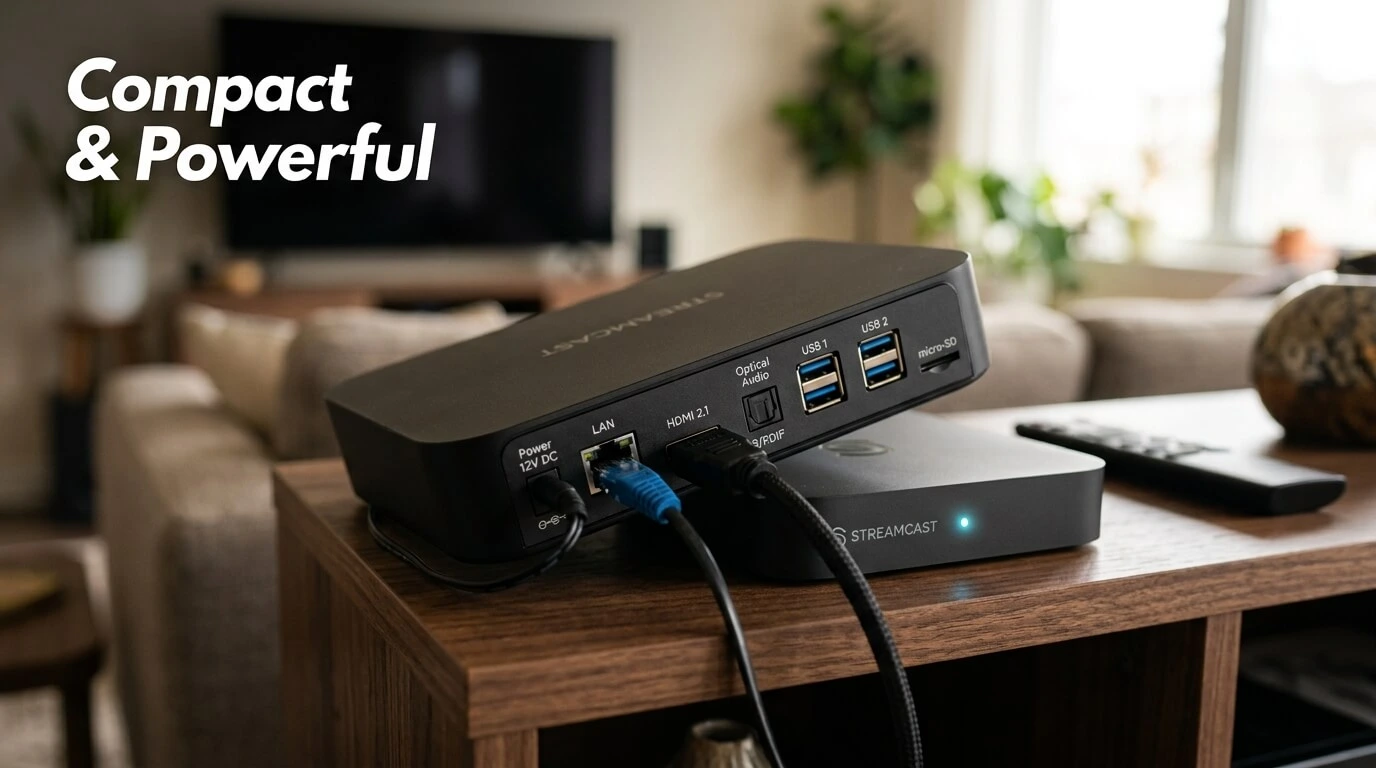

Have you ever wished your ordinary television could do more than show cable channels and connect to a few basic devices? A Smart TV box can turn a regular TV into a connected entertainment system. Instead of replacing your television, you can connect a small device to it and access streaming services, apps, music, online videos, games, and much more.
But what exactly is a Smart TV box, and how does it work? Is it worth buying? What should you look for before choosing one?
This guide explains everything in simple language so you can understand how these devices work and decide whether one is right for your home.
1. What Is Smart TV Box?
A Smart TV box is a small electronic device that connects to your television and gives it smart features. It normally connects to the TV through an HDMI port and uses an internet connection to provide access to online content and applications.
Think of it as a small computer designed mainly for your television. Your TV provides the screen and speakers, while the box provides the software, internet connection, apps, and processing power.
A typical device can let you browse streaming platforms, watch online videos, listen to music, install applications, view photographs, and sometimes play games.
The exact features depend on the operating system, hardware, manufacturer, and available applications.
For example, some devices are designed primarily for streaming, while others offer more flexible software and storage options.
The basic idea is simple: instead of buying a completely new smart television, you can add smart capabilities to an existing TV.
This can be particularly useful if your current television still has a good picture but lacks modern internet-connected features.
2. How Does a Smart TV Box Work?
A Smart TV box works by receiving digital content through an internet connection and displaying it on your television.
The process is relatively straightforward.
First, you connect the box to your television using an HDMI cable. You then connect the device to the internet, usually through Wi-Fi or an Ethernet cable.
After turning it on, the device displays its operating system on your TV screen. You can then use a remote control to navigate menus, download compatible applications, change settings, and play content.
Some models also support voice commands, Bluetooth accessories, casting, and external storage.

The Role of the Operating System
The operating system controls how the device works. Different boxes can use different platforms, and the available apps and interface can vary considerably.
The operating system determines things such as:
- Which apps are available
- How menus are organized
- How updates are delivered
- What accessories are supported
- What streaming formats are compatible
This is one reason you should not choose a device based only on price.
A cheap box may look attractive, but its software experience, security updates, app compatibility, and performance may be less impressive.
3. What Can You Do With a Smart TV Box?
So, what can you actually do with one?
Quite a lot.
A modern Smart TV box can become the central entertainment device in your living room.
Watch Streaming Services
One of the most common uses is streaming movies and television programs through supported services.
Depending on the device and region, you may be able to access popular entertainment platforms, video services, sports applications, news platforms, and other online content.
Watch Online Videos
You can also use many boxes to watch online video content without connecting a computer to your TV.
Instead of sitting at a desk or holding your phone, you can enjoy content on the larger screen.
Listen to Music
Many devices support music applications. You can connect your television to a soundbar, home theater system, or compatible speakers for a more enjoyable listening experience.
Browse the Internet
Some Smart TV boxes support web browsers. This allows you to visit websites from your television, although browsing with a remote is usually less convenient than using a phone or computer.
Play Games
Depending on the hardware and software, you may be able to play casual games or use cloud gaming services.
However, a streaming-focused box should not automatically be treated as a high-performance gaming console.
View Photos and Personal Media
Some devices allow you to access photographs, videos, and other media stored on external drives or network-connected devices.
This can be useful for family photos, personal videos, and downloaded media.
4. Smart TV Box vs Smart TV
A common question is whether a Smart TV box is better than buying a Smart TV.
The answer depends on your situation.
A Smart TV has its smart features built directly into the television. A Smart TV box is an external device that adds those capabilities to an existing TV.
Why Choose a Smart TV Box?
If your current TV has a good display but outdated software, an external box can be a practical upgrade.
You don’t need to replace the entire television.
It is similar to upgrading the engine of an old vehicle instead of buying a completely new car. The screen remains the same, but the external device can provide a newer entertainment experience.
Another advantage is flexibility. You can replace the box later without replacing the TV.
Why Choose a Smart TV?
A new Smart TV provides an all-in-one solution. There is no separate box or HDMI cable to manage, and the smart interface is integrated into the television.
However, television software can eventually become outdated. An external device can sometimes offer an easier upgrade path.

5. Main Features to Look For
Not all Smart TV boxes are equal.
Before buying one, pay attention to several important specifications.
Processor and Performance
The processor affects how quickly menus open, applications launch, and content is handled.
A stronger processor can make the overall experience feel smoother, especially when switching between apps.
RAM
RAM helps the device handle active applications and processes.
More RAM does not automatically make every device better, but sufficient memory can contribute to smoother multitasking.
Storage
Storage is important if you plan to install many applications or keep media on the device.
Some models provide limited internal storage, while others offer expansion through USB or other supported methods.
Video Resolution
Look at the maximum resolution supported by the device.
Common resolutions include:
- HD
- Full HD
- 4K Ultra HD
However, buying a device that supports 4K does not mean every video will automatically appear in 4K. The content, television, internet connection, application, and subscription can all affect the final quality.
Wi-Fi and Ethernet
A reliable internet connection is extremely important for streaming.
Some devices support newer Wi-Fi standards, while others provide Ethernet for a wired connection.
If your router is far away or Wi-Fi is unreliable, Ethernet can be useful when available.
Bluetooth
Bluetooth support allows compatible accessories such as headphones, keyboards, controllers, and other devices to connect wirelessly.
6. Types of Smart TV Boxes
There are several types of devices available.
Streaming-Focused Devices
These are designed primarily for watching online entertainment.
They generally have simple interfaces and are easy for beginners to use.
Android-Based TV Boxes
Some boxes use Android-based software and provide access to a wide range of applications.
However, there is a major difference between reputable devices and unknown products.
Before purchasing an Android-based box, check whether it uses legitimate software, receives updates, and supports the applications you actually need.
Premium Streaming Devices
Higher-end products often focus on fast performance, reliable software, strong app support, and better long-term usability.
They may cost more, but the additional price can be worthwhile if you use the device every day.
Budget TV Boxes
Budget models can be useful for basic tasks, but specifications can sometimes be misleading.
A box advertising large storage or high resolution may still have poor software optimization or limited support.
This is why real-world reliability matters as much as numbers on a product page.
7. How to Set Up a Smart TV Box
Setting up a Smart TV box is usually easier than many people expect.
Step 1: Connect the HDMI Cable
Plug one end of the HDMI cable into the TV box and the other into an available HDMI port on your television.
Step 2: Connect the Power
Use the supplied power adapter to connect the box to a suitable power source.
Step 3: Select the Correct HDMI Input
Turn on your television and select the HDMI input where the box is connected.
Step 4: Connect to the Internet
Choose your Wi-Fi network and enter the password.
If your device supports Ethernet, you can connect it directly to your router.
Step 5: Sign In
Depending on the platform, you may need to sign in with an account.
Step 6: Install Applications
Install the apps you need from the device’s official application store or supported software source.
Step 7: Update the Device
Check for system and application updates.
Keeping software updated can improve compatibility, performance, and security.
8. Internet and Connectivity Requirements
A Smart TV box depends heavily on your internet connection.
Even an expensive device can struggle if your internet connection is unstable.
For normal streaming, a reliable broadband connection is usually more important than simply having a very high advertised speed.
Wi-Fi vs Ethernet
Wi-Fi is convenient because it eliminates cables.
Ethernet can provide a more consistent connection when the router is close enough to run a network cable.
If you experience buffering, try moving the router closer, reducing interference, using Ethernet where practical, or improving your home network.
Remember that streaming quality can also be affected by network congestion and the service provider’s servers.
9. Apps, Streaming and Entertainment
Applications are what make a Smart TV box genuinely useful.
Depending on your device, you may find applications for:
- Movies and television
- Music
- News
- Sports
- Online video
- Weather
- Education
- Podcasts
- Games
- Photo viewing
However, app availability varies by country and platform.
You should always use legitimate applications and services. Be cautious about boxes advertised with claims such as “free access to every premium channel” or “all movies included forever.”
Such claims can involve unauthorized services, unreliable software, privacy risks, or malware.
A good rule is simple: if an offer sounds unrealistically generous, investigate it before paying for it or installing anything.
10. Advantages and Disadvantages
Like any technology, Smart TV boxes have both benefits and drawbacks.
Advantages
Affordable upgrade: You can add smart features without replacing your television.
Flexible: You can replace the box when newer technology becomes available.
Portable: Many devices are small enough to move between compatible TVs.
Large app selection: Depending on the platform, you may have access to many applications.
Easy entertainment: Streaming and other digital services can be brought together in one interface.
Potentially better performance: An external box can sometimes be faster than the built-in software of an older Smart TV.
Disadvantages
Another device: You have to manage an additional box, remote, cable, and power adapter.
Internet dependence: Many features require a reliable connection.
Different software quality: Some inexpensive products provide poor interfaces or limited updates.
Compatibility limitations: Certain apps or services may not work on every device.
Security concerns: Unknown manufacturers and unofficial software can create unnecessary risks.
11. How to Choose the Right Smart TV Box
Choosing the right device becomes easier when you first decide what you actually need.
If you mainly want to watch streaming services, a simple, reputable streaming device may be enough.
If you want gaming, external storage, advanced connectivity, or a broader range of applications, you may need more powerful hardware.
Consider Your Television
First, check your TV’s available ports and maximum resolution.
There is little reason to pay extra for features your television cannot use.
Consider Your Internet
If you have a weak Wi-Fi signal near the television, look for a device with good wireless support or Ethernet connectivity.
Consider Your Apps
Make a list of the services you actually use.
Before buying, confirm that those applications are officially supported on the device.
Consider Updates
Software support is extremely important.
A device that receives regular updates can remain useful for longer than one that is abandoned shortly after purchase.
Consider Your Budget
Don’t automatically choose the cheapest option.
Instead, think about value over time. Paying slightly more for dependable hardware and software may save you frustration later.
12. Is a Smart TV Box Worth It?
For many people, yes.
A Smart TV box can be an excellent solution if you already own a television with a good screen but outdated smart features.
It is particularly useful for people who want streaming, applications, online video, and other connected features without buying a new television.
However, you don’t necessarily need one if your existing Smart TV already performs everything you want.
The best purchase is not the device with the longest specification list. It is the one that solves your actual problem.
Ask yourself: What do I want my television to do?
Once you answer that question, choosing the right device becomes much easier.
13. Common Problems and Solutions
Even a good Smart TV box can occasionally have problems.
Buffering While Streaming
Buffering can be caused by weak Wi-Fi, network congestion, slow internet, or problems with the streaming service.
Try restarting the router and device, moving the router closer, or using Ethernet if possible.
Remote Control Problems
Replace the batteries and make sure there are no obstructions between the remote and receiver.
If the remote uses Bluetooth, check whether it needs to be paired again.
Apps Not Working
Check for application updates and system updates.
If an app remains unavailable, confirm that it officially supports your device and region.
Device Running Slowly
Restarting the box can sometimes help.
You can also remove unnecessary applications and check available storage.
Older hardware may naturally become slower as software becomes more demanding.
No Picture
Check that the HDMI cable is properly connected and that the television is set to the correct HDMI input.
If possible, test another HDMI port or cable.
14. Conclusion
A Smart TV box is essentially a compact computer for your television. It can add streaming, applications, online video, music, games, and other connected features to a compatible TV.
For someone with an older television, it can be a convenient and relatively affordable upgrade. But the right choice depends on your TV, internet connection, preferred applications, budget, and desired features.
Rather than choosing a box simply because it advertises impressive specifications, focus on reliable software, legitimate apps, useful connectivity, good performance, and ongoing updates.
In the end, the best Smart TV box is the one that makes your everyday viewing simpler and more enjoyable.
15. Frequently Asked Questions
1. What is a Smart TV box used for?
A Smart TV box is used to add internet-connected features to a television. Depending on the model, it can provide access to streaming services, online videos, music, applications, games, and other digital content.
2. Can a Smart TV box work with any TV?
Most modern Smart TV boxes require an HDMI-compatible television. Older TVs without HDMI may require additional compatible equipment, and not every feature will work on every television.
3. Does a Smart TV box need Wi-Fi?
Most Smart TV boxes need internet access for streaming and online applications. Wi-Fi is common, while some models also support a wired Ethernet connection.
4. Can I watch Netflix and other streaming services on a Smart TV box?
Many reputable devices support popular streaming applications, but availability depends on the device, operating system, region, and service. Always check official compatibility before buying.
5. Is a Smart TV box better than a Smart TV?
Neither is automatically better. A Smart TV combines the screen and smart features in one device, while a Smart TV box can upgrade an existing television and may be easier to replace later. Your needs and budget should determine which option makes more sense.
