


Introduction
Modern vehicles are like rolling computers. Behind every dashboard light, engine warning, or hidden feature, there’s software quietly running the show. For Ford owners, one of the most powerful tools available for understanding and customizing their vehicles is FORScan.
If you’ve ever wished you could diagnose a car problem without rushing to a mechanic or unlock hidden settings in your vehicle, this software may feel like finding a secret control room. Think of it as a translator between you and your Ford vehicle’s electronic systems.
Over the years, FORScan has gained popularity among drivers who want deeper access to their cars without spending a fortune at dealerships. Whether you drive a Ford truck, Lincoln SUV, or Mazda model with Ford-based systems, this tool opens doors to advanced diagnostics, maintenance functions, and customization options.
In this guide, you’ll learn what FORScan is, how it works, why people use it, and how beginners can safely get started.

What Is FORScan?
FORScan is specialized diagnostic software designed mainly for Ford, Lincoln, Mazda, and Mercury vehicles. Unlike standard car scanners that provide only basic engine codes, this tool can communicate with deeper vehicle modules.
Most ordinary OBD2 scanners work like a flashlight in a dark room. FORScan, on the other hand, works more like turning on the entire building’s electrical system. It reveals hidden settings, advanced error codes, and service features that standard tools often miss.
Drivers commonly use it for:
- Reading and clearing trouble codes
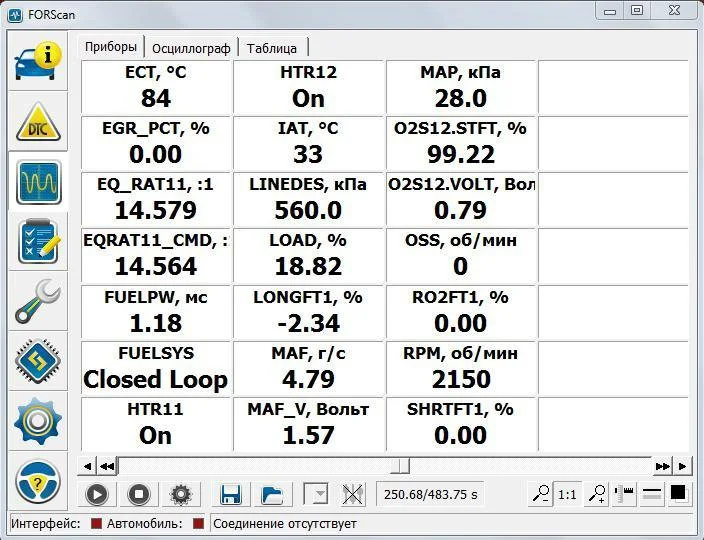
- Monitoring live vehicle data
- Performing service procedures
- Customizing factory settings
- Diagnosing electrical problems
Its popularity continues to grow because it gives everyday car owners dealership-level access without dealership-level pricing.
How FORScan Works
FORScan communicates with your vehicle through the OBD2 port, usually located beneath the dashboard. The software connects to a laptop, smartphone, or tablet using a compatible adapter.
Once connected, it can access various control modules inside the vehicle, including:
- Engine control systems
- Transmission modules
- Airbag systems
- Climate controls
- Lighting systems
- Steering modules
These modules constantly exchange information. FORScan acts like an interpreter that helps you understand what those systems are saying.
The software retrieves diagnostic trouble codes and displays real-time information such as:
- Engine temperature
- Fuel pressure
- Battery voltage
- Sensor activity
- Transmission data
This makes troubleshooting far easier and more accurate.

Vehicles Compatible With FORScan
One reason FORScan has become so popular is its wide compatibility across Ford-related brands.
Supported Brands
The software primarily supports:
- Ford
- Lincoln
- Mercury
- Mazda
Some compatibility may vary depending on model year and vehicle platform.
Popular Models Used With FORScan
Many owners use FORScan on vehicles such as:
- Ford F-150
- Ford Ranger
- Ford Explorer
- Ford Escape
- Ford Mustang
- Lincoln Navigator
- Mazda Tribute
Newer models often provide even more programmable options because they contain more electronic modules.
Key Features and Functions
FORScan offers an impressive range of tools that go far beyond simple diagnostics.
Reading Diagnostic Codes
One of the most useful features is reading manufacturer-specific trouble codes. These codes provide detailed information that many cheap scanners cannot detect.
Live Data Monitoring
You can view real-time performance information while driving or idling. This helps identify problems that occur intermittently.
Module Programming
Advanced users can change factory settings inside control modules. This is where customization becomes exciting.
Service Functions
FORScan can perform maintenance procedures like:
- Battery management resets
- ABS bleeding
- Injector coding
- Steering angle resets
- DPF regeneration
These functions often require expensive dealership equipment.
Benefits of Using FORScan
Why are so many drivers interested in FORScan? The answer comes down to convenience, savings, and control.
Save Money on Repairs
A single dealership diagnostic session can cost a significant amount. FORScan allows owners to identify issues themselves before paying for repairs.
Understand Your Vehicle Better
Cars today are filled with technology. Using FORScan helps drivers better understand how their vehicles operate.
Unlock Hidden Features
Many Ford vehicles contain disabled features that can be activated through software settings.
Prevent Bigger Problems
Early detection is incredibly valuable. A small issue caught early may prevent major damage later.
FORScan Hardware Requirements
The software itself is only part of the setup. You also need compatible hardware.
OBD2 Adapter
A quality adapter is essential. Cheap adapters sometimes fail to communicate properly.
Popular adapter types include:
- USB adapters
- Bluetooth adapters
- Wi-Fi adapters
Many users prefer adapters with HS/MS CAN switching for full module access.
Compatible Devices
FORScan works on:
- Windows laptops
- Android devices
- iPhones and iPads
However, the Windows version usually offers the most advanced features.
Installing and Setting Up FORScan
Getting started is easier than many people expect.
Step 1: Download the Software
Visit the official FORScan website and download the version for your device.
Step 2: Install Drivers
Some adapters require additional drivers before they work properly.
Step 3: Connect the Adapter
Plug the adapter into the vehicle’s OBD2 port and pair it with your device.
Step 4: Start the Vehicle
Most functions require the ignition to be on.
Step 5: Scan Modules
The software automatically detects supported modules inside the vehicle.
The first connection may feel intimidating, but after a few minutes, the interface becomes surprisingly manageable.
Popular Customizations With FORScan
Customization is one of the biggest reasons enthusiasts love FORScan.
Lighting Changes
Users commonly modify:
- Daytime running lights
- Fog light behavior
- Auto high beams
- Interior lighting
Convenience Features
Some owners enable hidden options such as:
- Global window controls
- Double horn disable
- Remote start adjustments
- Auto-fold mirrors
Display Tweaks
Dashboard displays can often be customized for a more personalized driving experience.
It’s a little like customizing your smartphone settings—except you’re adjusting your vehicle’s personality.
Diagnosing Vehicle Problems
FORScan is especially powerful for troubleshooting.
Finding Electrical Issues
Modern cars rely heavily on electronics. FORScan can help pinpoint faulty modules and communication problems.
Tracking Sensor Failures
The software identifies malfunctioning sensors quickly through live monitoring.
Monitoring Battery Health
Many Ford vehicles depend heavily on stable battery performance. FORScan can reveal charging issues before they become serious.
Checking Transmission Performance
Transmission data helps identify slipping, overheating, or shifting problems.
This level of detail can dramatically reduce guesswork.
Risks and Safety Precautions
Although FORScan is powerful, it should be used carefully.
Incorrect Programming Risks
Changing the wrong settings can create vehicle problems or disable features unintentionally.
Battery Voltage Matters
Low battery voltage during programming may interrupt communication and cause module issues.
Using a battery charger during advanced procedures is often recommended.
Backup Original Settings
Before making changes, always save original module data.
This simple step can save hours of frustration later.
Avoid Random Internet Settings
Not every online tutorial is accurate. Verify information from trusted communities before making changes.
FORScan vs Traditional OBD2 Scanners
Many people wonder whether FORScan replaces a standard scanner.
Traditional Scanners
Basic scanners mainly focus on engine trouble codes.
They are usually:
- Simpler
- Faster
- Easier for beginners
FORScan
FORScan provides:
- Deeper module access
- Advanced diagnostics
- Vehicle customization
- Service procedures
The difference is similar to comparing a pocket calculator with a full computer. Both are useful, but one offers far greater capabilities.
Tips for Beginners
Starting slowly is the smartest approach.
Learn Before Changing Settings
Spend time exploring menus and reading documentation first.
Start With Diagnostics
Reading codes and monitoring data are safer beginner tasks than programming modules.
Join Online Communities
FORScan communities provide valuable tutorials and troubleshooting advice.
Keep Notes
Record every change you make. This helps reverse modifications if necessary.
Patience matters more than technical expertise in the beginning.
Common Mistakes to Avoid
Many beginner frustrations come from avoidable errors.
Using Cheap Adapters
Low-quality adapters often disconnect or fail during programming.
Ignoring Backups
Skipping backups is one of the most common mistakes.
Changing Multiple Settings at Once
Adjusting many options simultaneously makes troubleshooting difficult later.
Not Updating Software
Updated versions improve compatibility and stability.
A careful approach prevents most major issues.
The Growing Community Around FORScan
FORScan has developed a passionate global community.
Thousands of users share:
- Tutorials
- Spreadsheet databases
- Vehicle settings
- Troubleshooting advice
- Programming guides
This collective knowledge makes learning easier for beginners.
Forums and online groups often provide answers faster than official repair manuals. It’s like having a giant virtual garage full of experienced enthusiasts ready to help.
Final Thoughts
FORScan has transformed how Ford owners interact with their vehicles. What once required expensive dealership tools is now accessible to ordinary drivers willing to learn.
For some people, it starts as simple curiosity—checking a warning light or enabling a hidden feature. For others, it becomes a valuable skill that saves money and builds confidence.
The key is using the software responsibly. Take your time, learn gradually, and always back up original settings before making changes.
Modern vehicles may be complex, but tools like FORScan help make that complexity understandable. Instead of feeling locked out of your own car’s technology, you gain the ability to communicate with it directly.
And honestly, that can feel surprisingly empowering.
FAQs
1. Is FORScan free to use?
FORScan offers a free version with many useful features. However, some advanced functions require an extended license.
2. Can FORScan damage a vehicle?
If used incorrectly, changing module settings may create problems. Following instructions carefully and backing up data greatly reduces risks.
3. Does FORScan work on all Ford vehicles?
It works on many Ford, Lincoln, Mazda, and Mercury vehicles, though compatibility depends on model year and system support.
4. What adapter works best with FORScan?
Reliable adapters with HS/MS CAN support are generally recommended because they provide broader module access and stable communication.
5. Can beginners use FORScan safely?
Yes, beginners can safely use FORScan for diagnostics and monitoring if they start slowly, read guides carefully, and avoid advanced programming at first.
